minNotes
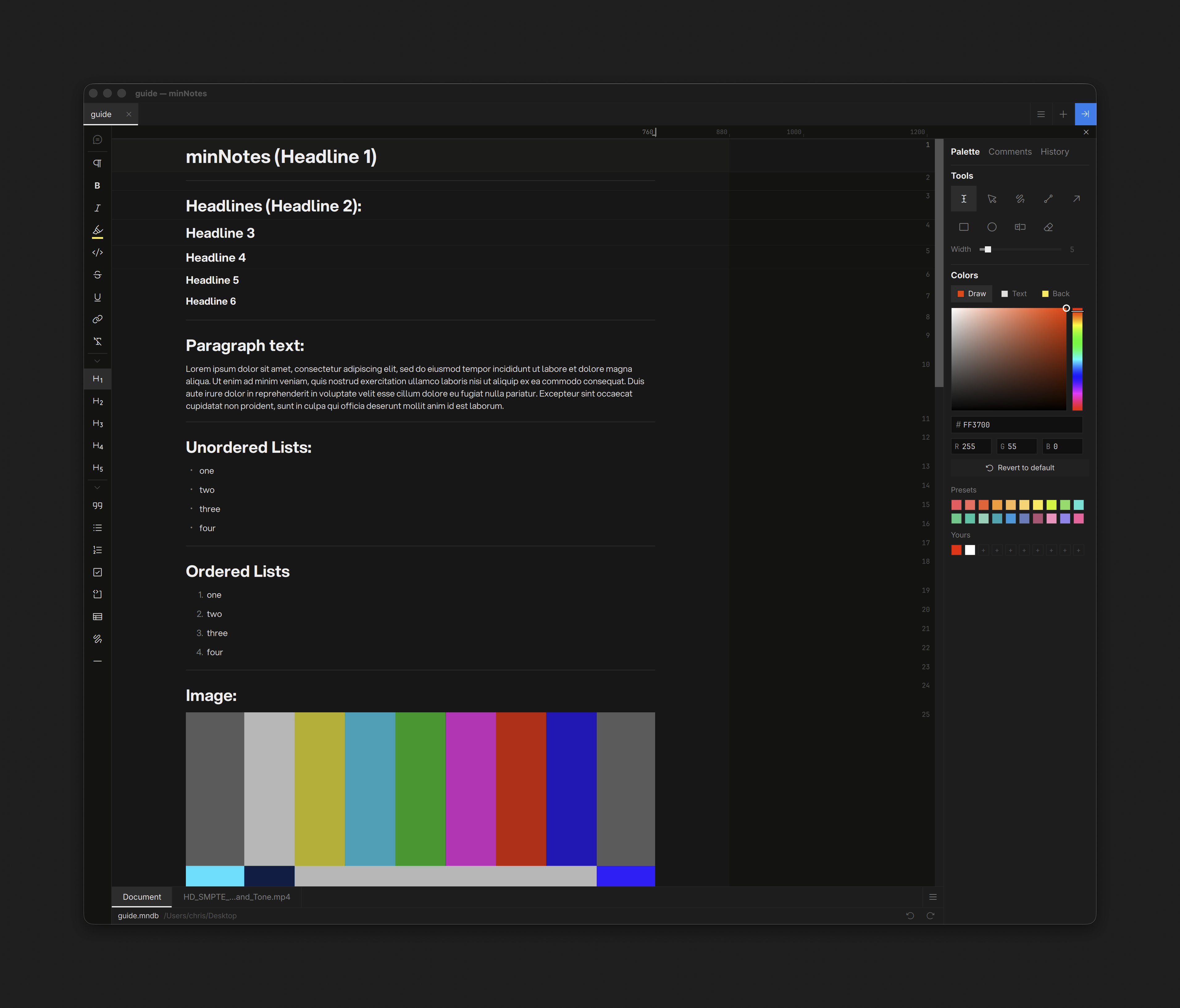
minNotes is a fast notes editor for macOS and Windows built around a canvas. A file is an infinite canvas; pages sit on it as cards beside videos, PDFs, images, audio, folders, files and links, and you can draw anywhere. Each page is a block editor with Markdown-style input. Files are plain SQLite (.mnd) you can keep anywhere — local disk, a network share, Dropbox, LucidLink — and open on either platform without the file-locking trouble shared storage usually brings.
Key Features
The Canvas
- Any number of pages per file, laid out however you like; double-click a page to open it
- Drop anything: video, PDF, images, audio, folders, files, links, other minNotes files, Evernote and Notion exports — each becomes a card
- Video plays in place with the full transport keys; PDFs page in place; images open in a lightbox in exports
- Pen, shapes, arrows and text chips with live colour and width; select, move, duplicate, reorder; one undo per surface
Writing
- Block editor — paragraphs, headings 1–6, quotes, syntax-highlighted code, bullet / numbered / task / choice lists, dividers
- Markdown-style input: type
##,-,>, ` ``` ` and the block converts as you go - Inline formatting with text colour and highlight, links, and inline choice chips (To do / Doing / Done anywhere in text)
- Spelling and grammar checking as you type — on-device, US and UK English both accepted
- Pages are the width of the window, with an optional readable measure
- Blocks side by side: drag any block next to another to make lanes
- A block rail down the right side — drag a block’s handle to reorder
- Full undo history: the page’s timeline, click to time-travel
- Search the whole file: pages, cards, PDF text, video notes
Tables
- Cells hold blocks — text, formatting, images, video; choice, checkmark, and timecode columns
- Grip-select rows, columns, or cell ranges for bulk operations — delete, clear, colour, retype, copy-as-table — each a single undo
- Sort, drag-reorder columns, a tab per table with a row filter
- One-click kanban board view grouped by any choice or check column
Media & Review
- Inline images, video (scrub, skim audio, annotate — interchangeable with QCView), page-by-page PDFs, file attachments
- Local files copy into the file’s media folder automatically; network shares stay referenced in place, with cross-OS path mapping
Files
- Import: Markdown, text, CSV/TSV, HTML, Word, Excel, OpenDocument, source code, RTF (macOS), Evernote, Notion
- Export a page as Markdown + assets, a self-contained HTML page, Word, or print-ready PDF; export the whole canvas as an HTML canvas you can pan and zoom, or a PNG poster
- Sealed
.mnpkgpackages — one file with every referenced asset inside, video plays straight from the archive
Get Going
- Download the latest
.dmgfrom the releases page (macOS) or get minNotes from the Microsoft Store (Windows) — see Installation. - Open or create a file, then start with Files & Pages, the Canvas tour and the Editing primer.
- Keep the Keyboard shortcuts close.
minNotes is free software, licensed GPL-3.0-or-later. Third-party components and their licenses are listed under Licenses & Credits. It runs entirely on your machine — see Privacy.